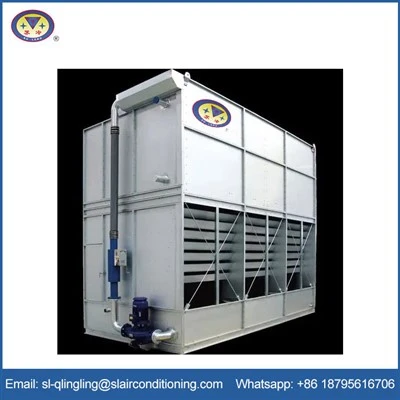
When it comes to maintaining an optimal environment in a computer room, temperature control stands as a paramount concern. Computers generate a significant amount of heat during their operation, and if this heat is not effectively managed, it can lead to a multitude of issues, such as reduced performance, hardware malfunctions, and even permanent damage. Among the various cooling solutions available in the market, One Fans Air Cooler has emerged as a potential option. As a supplier of One Fans Air Cooler, I will delve into whether this product is suitable for a computer room.
Understanding the Requirements of a Computer Room
Before evaluating the suitability of One Fans Air Cooler, it is essential to understand the specific requirements of a computer room. Computer equipment, including servers, storage systems, and networking devices, generates heat through the electrical resistance in their components. The heat output can vary depending on the type, number, and usage of the equipment. Generally, a computer room requires a stable temperature range, typically between 18°C to 27°C (64°F to 81°F), and a relative humidity level between 40% to 60%. Deviations from these ranges can cause thermal stress on the components, leading to system failures and data loss.
Features and Working Principle of One Fans Air Cooler
One Fans Air Cooler, available at One Fans Air Cooler, operates on the principle of evaporative cooling. It draws in warm air from the surrounding environment and passes it through a wet cooling pad. As the air passes through the pad, water evaporates, absorbing heat from the air and cooling it down. The cooled air is then circulated back into the room using a fan. This process not only lowers the temperature but also increases the humidity slightly.
One of the key features of One Fans Air Cooler is its energy efficiency. Compared to traditional air - conditioning systems, which rely on compressors and refrigerants, evaporative coolers consume significantly less electricity. They are also relatively quiet in operation, which is an advantage in a computer room where noise can be a distraction. Additionally, One Fans Air Cooler is portable and easy to install, making it a flexible solution for different room layouts.
Advantages of Using One Fans Air Cooler in a Computer Room
Energy Savings
As mentioned earlier, the energy efficiency of One Fans Air Cooler is a major advantage. In a computer room, where cooling systems are often running continuously, energy costs can be a significant expense. By using an evaporative cooler instead of a traditional air - conditioner, businesses can reduce their electricity bills substantially. This is especially beneficial for small to medium - sized computer rooms with limited budgets.
Improved Air Quality
Evaporative coolers not only cool the air but also act as air purifiers. As the air passes through the wet cooling pad, dust, pollen, and other airborne particles are trapped, improving the overall air quality in the computer room. This is important for the longevity of the computer equipment, as dust accumulation can cause overheating and mechanical failures.
Flexibility
The portability of One Fans Air Cooler allows for easy relocation within the computer room. If there are areas with higher heat loads, such as near servers or networking racks, the cooler can be moved to those areas to provide targeted cooling. This flexibility is not always possible with fixed - installation air - conditioning systems.
Limitations of One Fans Air Cooler in a Computer Room
Humidity Control
One of the main limitations of evaporative coolers is their impact on humidity. While a slight increase in humidity can be beneficial in some cases, excessive humidity can be detrimental to computer equipment. High humidity levels can cause condensation on the components, leading to short - circuits and corrosion. In regions with high ambient humidity, the effectiveness of One Fans Air Cooler may be reduced, as the air already contains a significant amount of moisture, and further evaporation becomes difficult.
Cooling Capacity
The cooling capacity of One Fans Air Cooler may not be sufficient for large computer rooms or those with high - density equipment. Evaporative coolers are generally more suitable for small to medium - sized spaces. In a large computer room with a high heat load, multiple coolers may be required, which can increase the initial investment and the complexity of the cooling system.
Comparison with Other Cooling Solutions
Industrial Portable Air Cooler
Industrial Portable Air Cooler is another option for computer room cooling. These coolers are designed for industrial applications and typically have a higher cooling capacity than One Fans Air Cooler. However, they may also be more expensive and consume more energy. Industrial portable air coolers are often used in larger computer rooms or those with heavy - duty equipment.
An Industrial Air Cooler
An Industrial Air Cooler is a more powerful and robust cooling solution. It is usually a fixed - installation system with a high cooling capacity and advanced features such as precise temperature and humidity control. While it can provide reliable cooling for large computer rooms, it requires a significant upfront investment and professional installation.


Conclusion
In conclusion, One Fans Air Cooler can be a suitable option for some computer rooms, especially small to medium - sized ones with moderate heat loads and in regions with low to moderate humidity. Its energy efficiency, portability, and ability to improve air quality make it an attractive choice. However, it is important to consider the limitations, such as humidity control and cooling capacity. Before making a decision, it is advisable to conduct a thorough assessment of the computer room's requirements, including the size, heat load, and ambient conditions.
If you are interested in exploring the possibility of using One Fans Air Cooler for your computer room, I encourage you to contact us for a detailed consultation. We can provide you with more information about the product, its specifications, and how it can be customized to meet your specific needs. Let's work together to find the best cooling solution for your computer room.
References
- ASHRAE (American Society of Heating, Refrigerating and Air - Conditioning Engineers). (2011). Thermal Guidelines for Data Processing Environments.
- Computer Technology Industry Association (CompTIA). (2019). A+ Certification Study Guide.